Monday, April 20 2026

Month: September 2022

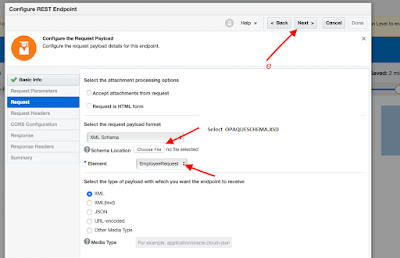
  Schema ❓ In OIC Schema File (i.e. XML Schema) is used to define the structure of the file which is being used to store data. Below is an example of an XML schema, or XML schema definition (XSD). – Advertisement – <xs:schema attributeFormDefault=”unqualified” elementFormDefault=”qualified” targetNamespace=”http://xmlns.oracle.com/employeedetails” xmlns:xs=”http://www.w3.org/2001/XMLSchema”> <xs:element name=”EmployeeRequest”> <xs:complexType> <xs:sequence> <xs:element name=”Employee” maxOccurs=”unbounded”> <xs:complexType> <xs:sequence> <xs:element
  Schema ❓ In OIC Schema File (i.e. XML Schema) is used to define the structure of the file which is being used to store data. Below is an example of an XML schema, or XML schema definition (XSD). – Advertisement – <xs:schema attributeFormDefault=”unqualified” elementFormDefault=”qualified” targetNamespace=”http://xmlns.oracle.com/employeedetails” xmlns:xs=”http://www.w3.org/2001/XMLSchema”> <xs:element name=”EmployeeRequest”> <xs:complexType> <xs:sequence> <xs:element name=”Employee” maxOccurs=”unbounded”> <xs:complexType> <xs:sequence> <xs:element

Schedule parameters : ❓  are available across all scheduled runs of an integration and can be used to facilitate processing of data from one run to the next. For example, when performing batch processing a schedule parameter can be used to track the current position of batched data between runs. Schedule Parameters : 🌟Maximum 5 variables can

Schedule parameters : ❓  are available across all scheduled runs of an integration and can be used to facilitate processing of data from one run to the next. For example, when performing batch processing a schedule parameter can be used to track the current position of batched data between runs. Schedule Parameters : 🌟Maximum 5 variables can