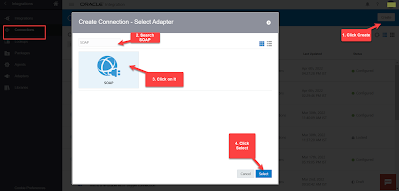
In this article I have mentioned the steps to Create Schedule Service SOAP Connection that can be use to Schedule BI Publisher Report through OIC.
- Login to OIC Instance. Navigate to Connections window, Click on Create button (top right) and then Search for SOAP Adapter. Select SOAP adapter and click Select button.

- Enter any meaningful name for the connection and then click create

- Enter the below details and then Click Test and then click Save :
- *WSDL URL : https://<domainname>/xmlpserver/services/v2/ScheduleService?wsdl
- Security : Select No Security Policy

- Connection is Active and ready to use in Integrations


Thanks Kabir
welcome 😊
in wsdl url what is domain name
Very nice
Thanks 🙂