please see the previous blog to see the integration development steps.


For Example , pass “invoking my first integration” message inlace of {message}


How To Activate the Integration :
Step 1: On the Oracle Integration Cloud Service home page, click the Integrations diagram.
Step 2: In the row for the Echo sample, click the Activate icon, then click Activate when prompted.


Step 3: Wait for the icon to turn green, indicating that it is activated.
– Advertisement –
How To Run the Integration :
Step 1: Click on the link that will pop up on screen top after activation as shown in below image

Step 2: Now copy the End Point URL(as highlighted in below image) and paste this URL in browser by passing your input message in place of {message} in URL.
*Open the URL in Firefox Browser because it may not work in Chrome Browser.
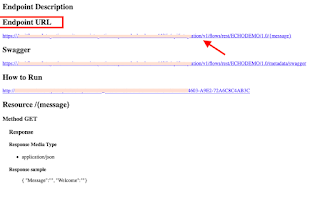
*Open the URL in Firefox Browser because it may not work in Chrome Browser.

https://hostname:port/integration/flowapi/rest/ECHODEMO/v01/{message}
For Example , pass “invoking my first integration” message inlace of {message}
https://hostname:port/integration/flowapi/rest/ECHODEMO/v01/Invoking my first integration
Note : You may see one pop up after clicking on End Point URL asking for credentials, there you have to enter your OIC login credentials(your OIC email id & password)

What Results Do You See :
You receive the following response in your browser:
{
“Message” : “Invoking my first integration.”,
“Welcome” : “\”Welcome to OIC!!! Echo was successful.\””
}
How To Monitor the Integration :
Step 1: In the navigation pane, click previous icon as shown below

Step 2: In the navigation pane, click Monitoring

– Advertisement –
Step 3: In the navigation pane, click Tracking and note that the integration is listed as completed.


You are the best friend, thank you very much for your guides, excellent start of the year
Thanks Raul for your kind words 🙂
simple step by step. thank you
Thanks tk 🙂