Clone an Existing Integration Flow in OIC | Cloning | Oracle Integration Cloud
In this article we will see the steps to clone (or copy) an Existing Integration flow. Lets see the cloning steps with an example where we will clone existing ‘Hello World’ Integration flow.
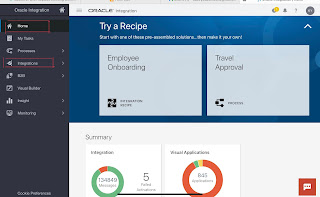
Step 1 : Open the integration Cloud Home page, click Integrations to navigate to Designer Home page.
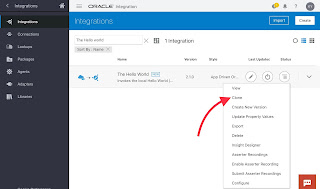
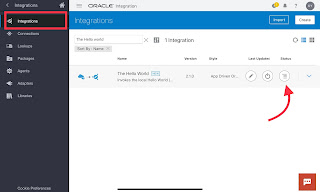
Step 2 : On the Integrations page, locate the Hello World integration flow. Click the menu option and then select Clone.
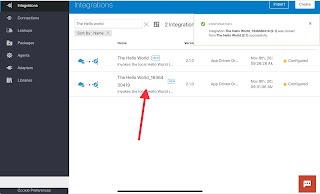
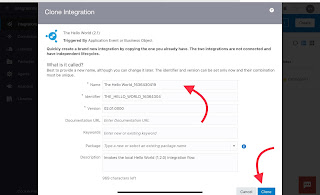
Step 3: Give the new integration an unique name and then click Clone. This way you have successfully cloned (or copy) an old integration. Now you can make changes in it as per your requirement.
Thank You !
You may also like
Archives
- November 2024
- October 2024
- May 2024
- June 2023
- December 2022
- October 2022
- September 2022
- June 2022
- May 2022
- April 2022
- March 2022
- February 2022
- January 2022
- December 2021
- November 2021
- August 2021
- July 2021
- May 2021
- March 2021
- January 2021
- November 2020
- October 2020
- September 2020
- May 2020
- March 2020
- February 2020
- January 2020
- December 2019
- August 2019
- July 2019
- June 2019
- May 2019
- March 2019
Calendar
| M | T | W | T | F | S | S |
|---|---|---|---|---|---|---|
| 1 | 2 | 3 | 4 | 5 | ||
| 6 | 7 | 8 | 9 | 10 | 11 | 12 |
| 13 | 14 | 15 | 16 | 17 | 18 | 19 |
| 20 | 21 | 22 | 23 | 24 | 25 | 26 |
| 27 | 28 | 29 | 30 | |||
Leave a Reply