Create Schedule Service SOAP Connection | Oracle Integration Cloud
In this article I have mentioned the steps to Create Schedule Service SOAP Connection that can be use to Schedule BI Publisher Report through OIC.
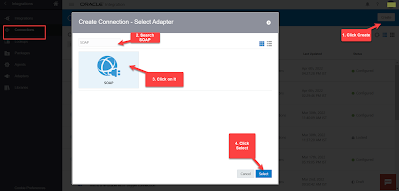
- Login to OIC Instance. Navigate to Connections window, Click on Create button (top right) and then Search for SOAP Adapter. Select SOAP adapter and click Select button.
- Enter any meaningful name for the connection and then click create
- Enter the below details and then Click Test and then click Save :
- *WSDL URL : https://<domainname>/xmlpserver/services/v2/ScheduleService?wsdl
- Security : Select No Security Policy
You may also like
5 comments
Leave a Reply to Anonymous Cancel reply
Archives
- November 2024
- October 2024
- May 2024
- June 2023
- December 2022
- October 2022
- September 2022
- June 2022
- May 2022
- April 2022
- March 2022
- February 2022
- January 2022
- December 2021
- November 2021
- August 2021
- July 2021
- May 2021
- March 2021
- January 2021
- November 2020
- October 2020
- September 2020
- May 2020
- March 2020
- February 2020
- January 2020
- December 2019
- August 2019
- July 2019
- June 2019
- May 2019
- March 2019
Calendar
| M | T | W | T | F | S | S |
|---|---|---|---|---|---|---|
| 1 | 2 | 3 | ||||
| 4 | 5 | 6 | 7 | 8 | 9 | 10 |
| 11 | 12 | 13 | 14 | 15 | 16 | 17 |
| 18 | 19 | 20 | 21 | 22 | 23 | 24 |
| 25 | 26 | 27 | 28 | 29 | 30 | 31 |


Thanks Kabir
welcome 😊
in wsdl url what is domain name
Very nice
Thanks 🙂