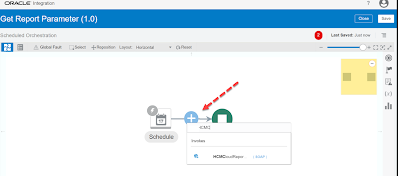
You can get the Report Parameters by selecting ‘getReportParameters‘ operations of the Standard SOAP WSDL (ExternalReportWSSService) Lets see the complete steps to get Report Parameters by doing one POC : Steps Overview : Create SOAP Connection using ‘ExternalReportWSSService’ WSDL Then Create a schedule integration using the above SOAP Connection inside which configure the SOAP Adapter
In this post I have tried to explain how we can use Create, Get & Update Worker REST API of HCM cloud with one simple example. Knowledge :👀 You can use Oracle HCM REST APIs to view and manage data stored in Oracle HCM Application Cloud and can be used as a bridge between external applications and
In this Article I have mentioned the steps to fetch external services certificates (ex – Oracle Cloud SaaS Application ) which we can import to OIC instance. Certificate enables Oracle Integration to connect with external services. Knowledge :👀 Certificates are used to validate outbound SSL connections. If you make an SSL connection in which the root certificate does
In this article we will see the steps to configure HCM cloud adapter in an Integration to Upload files to the Universal Content Management (UCM) or simply ‘content server’ in HCM Cloud. PART 1 : Create HCM Adapter Connection : Configure the connection using HCM Cloud Host name & Username Password Token Security policy (as
Knowledge : 👀 While Loop? : Loop over actions or invoke connections as long as a specific condition is met. You define the condition for the while loop in the Expression Builder. Lets understand the While Loop by the help of one Hands-on Practice. In Part 1 we will compare numbers and in Part 2
In this article we will see the steps to Upload a file to Oracle UCM (Universal Content Management server) through HCM Cloud application. STEP 1 : Login to HCM Cloud SaaS application STEP 2 : Expand the navigation bar and then expand Tools and then select ↑↓File Import and Export STEP 3 : click on
In this article we will see the steps to clone (or copy) an Existing Integration flow. Lets see the cloning steps with an example where we will clone existing ‘Hello World’ Integration flow. Step 1 : Open the integration Cloud Home page, click Integrations to navigate to Designer Home page. Step 2 : On the Integrations page, locate the Hello World integration flow. Click
To Create Free Trial OIC Instance you must have Oracle Cloud Free Tier Account. If you don’t have already and want to see the signup steps for it, Please access my previous blog (Click here). *Note : You won’t be charged unless you select to upgrade the account. After one month your free instance will automatically get closed. Steps to create
In this article I have mentioned the steps to delete a schedule from a scheduled Integration in Oracle Integration Cloud. Knowledge : 👀 Scheduled Orchestration ? : It enables you to create an integration that uses a schedule to trigger the integration instead of an adapter. After designing such integration, you can schedule when to run it. Step 1: Deactivate the Scheduled
Knowledge : 👀 Packages ? : You can group one or more integrations into a single structure called a package to easily import and export them to and from OIC service. Packages being optional, integration do not be a part of them. At least one integration is needed for a package to exist. You can put Integrations inside