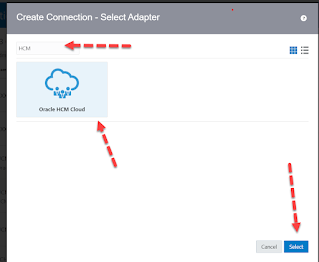
In this article I have wrote down the steps to create Oracle HCM Cloud Adapter connection in Oracle Integration Cloud.
– Advertisement –
- Login to OIC Instance, Click on top left hamburger sign and then click Integrations, Click Connections
- Click Create (Top Left ), Search for HCM Adapter. Select it and then click Create. Enter any meaningful name for the connection, leave the other fields as it is and click Create.

- Enter the below details, click Save and then click Test
- *HCM Cloud Host : Enter your HCM Cloud Host URL
- Security : Enter yours HCM cloud user credentials

Leave a Reply