

Blog

  • Develop an integration to get dynamic email notification | Oracle Integration Cloud

    Develop an integration to get dynamic email notification | Oracle Integration Cloud

    Knowledge :  👀 
    Notification? : Enables you to send notification email to relevant users at specific points in the execution of an integration.


    When we can use dynamic email notification ❓🤔

    suppose you want to send email notification that contain DATA in TABEL FORMAT which ROWS is not FIXED i.e. body of email notification is not fixed. Sometime it contain 2 rows , in next run it may need 50 rows etc. so table structure needs to be dynamic —> to handle such use case we need code OF DYNAMIC EMAIL NOTIFICATION.

    – Advertisement –


    Now lets develop one end to end Integration to see how we can implement logic to get dynamic email notification :

    Use Case :

    Our requirement is to send the Input data (employee records) of the integration via Email Notification in Tabular Format.
    Suppose we have one set of records the then the email table contain one row (as shown in below image)


    Similarly if we pass two sets of record, we will get email notification having two sets of record.  


    – Advertisement –


    Lets see the development steps in detail :
    STEP 1 :  
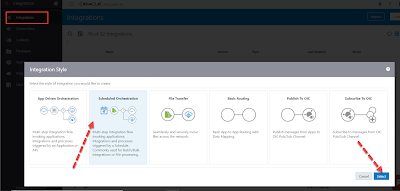
    Create a new App Driven Orchestration :
    Enter the below details and click Create:

    *What do you want to call your Integration? : Write a meaningful name
      What does this Integration do? : write meaningful description
                

    STEP 2 :  
    Search for the REST Connection which we have created earlier and configure it as shown in below image
    [ You can access this blog to know – how to Create REST Connection ]

    – Advertisement –


    Enter below details and click Next as shown in below image:

    *What do you want to call your endpoint ? : write meaningful name
    *What is the endpoint’s relative resource URI ? : 
     You can give any meaningful word with “/” 
     Example : /dynamicEmail

    * What action do you want to perform on the endpoint ? : select POST 
                
       &
       select Configure a request payload for this endpoint

    – Advertisement –


       ***Save this below Schema as Email.xsd

      download Email.xsd file from here – click to download

    Choose the above saved schema ” Email.xsd ” in next window & click Next and then click done [as shown in below image]


    STEP 3: 
    Now add one Assign action


    Knowledge :  👀 
    Assign ? Enables you to assign variables to integrations.


    – Advertisement –


    Enter below details & click Create:

    *Name : write a meaningful name
     Description : write small description
             
    click on ” + ” icon to add variable 

          
    Write variable name as vEmail (you can give any meaningful name) and click Edit button 
      

    Write the below code in Expression box and click Validate & then click     
    Close 

          “<table>
             <tr>
             <th>Name</th>
             <th>City</th>
             </tr>”

    – Advertisement –


    STEP 4 : 
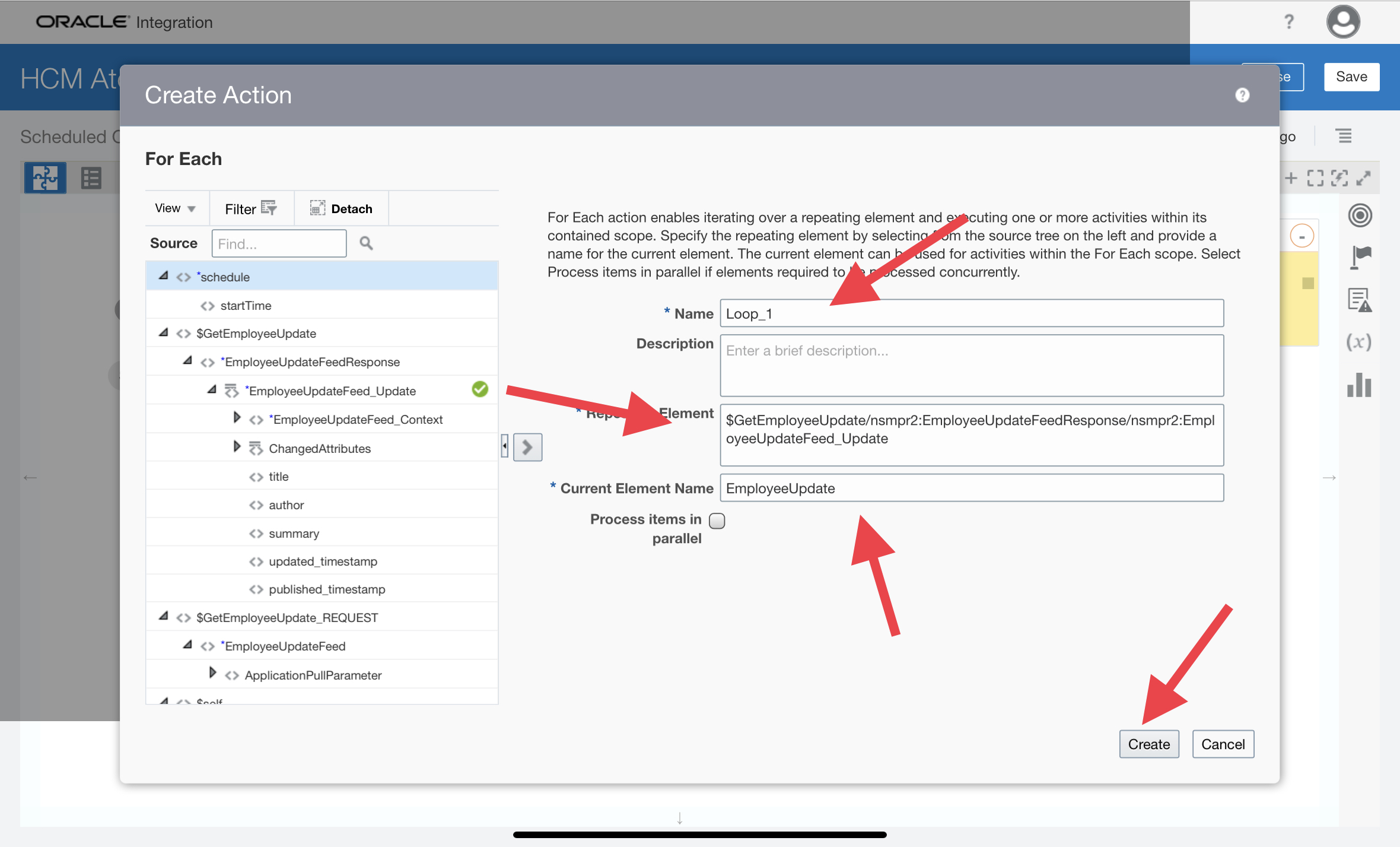
    Now add one For Each action 


    Knowledge :  👀 
    ForEach ?  Enables you to loop over a repeating element and execute one more actions within the scope of the for-each action.


    Enter the below details and click Create :

    *Name : write one meaningful name
    *Repeating Element : drag and drop the Employee tag from Source side as shown in below image 
    *Current Element Name : Current  (you can give any meaningful name but make a note of it because you need it later in this integration)
                 
    STEP 5: 
    Now add one Assign inside For Each 

    Enter below details & click Create :

    *Name : write one meaningful name 
     Description : write some meaningful description

    – Advertisement –


    Click ” + “ Select the Existing Variable ” vEmail “ and then click Edit 


    ***configure the Expression using Concat function and by dragging and   

    dropping the required fields form Source as shown in below image and then click Validate 

                 
     use this HTML Code in Expression

     style=’background-color:#C9CBCA;font-weight: lighter’
             

    – Advertisement –


    STEP 6:  
    Now add one assign outside of foreach to close the table

    Write one meaningful name and click Create

    Click the ” + ” icon and select the existing variable ” vEmail ” and click Edit
       

    Enter the below details inside Expression box to close the table and click Validate and then Click Close.

          concat($vEmail, “</table>”)

    – Advertisement –


    STEP 7: 
    Now the last part, add one Notification as shown in below image


    Enter the below details and then click Create :

    *Name :write one meaningful name
     Description : write some description


    Knowledge :  👀 
    Notification? : You Enables you to send notification email to relevant users at specific points in the execution of an integration.


      Now configure the Notification Payload by entering below details :      

               1. Click on ” + ” icon and give 

    ParameterName = body  (will use this in below HTML Body )& then click edit and provide the Parameter Value by dragging and dropping the vEmail variable form Source as shown in below images  

                2. Now enter the below details and click Validate and then click Close:

                           *From : Write from email address
                           *To : write the email address in which you want the Notifiaction

                           *Body : Enter the below HTML code as it is inside Body. This is 
                            a simple HTML code to define Email payload , you can use your  
                            own. 
                            **The important point is that inside the <div> tag ,the 
                            above defined parameter value {body} is added which contains 
                            our dynamic email values.


    <html>
    <head>
    <style>
    table, th, td {
      border: 1px solid black;
      border-collapse: collapse;
    }
    th, td {
      padding: 5px;
      text-align: left;
    }

    table th {
      background-color:#154668;
      color: white;
    }
      p{
      margin : 0;
      padding : 0;
      }
    </style>
    </head>
    <body>
    <br>
    <br>
    <p>Hi There,</p>
    <p> Below is the list of Employee details :</p>
    <br>
    <div>
    {body}
    </div>
    <br>
    <p>Thanks,</p>
    <p>XYZ</p>
    </body>
    </html>
     

    – Advertisement –


    STEP 8:  
    Last but not the least , enable the tracking as shown in below image
    drag and drop the Name column and then click save.

    Knowledge :  👀 

    Assigning Business Identifiers for Tracking Fields ? : Business identifiers enable you to track payload fields in messages during runtime.You must assign business identifiers before you can activate an integration.


    Done, you have successfully created the dynamic email notification service. Click SAVE and CLOSE the Integration. Please see NEXT blog to TEST this service. Thank You !

    – Advertisement –


  • Today’s Men and the crime against Women

    Today’s Men and the crime against Women


    This article is written by Kabir Yadav, a student, Former Integration Developer at Infosys & Deloitte, Views are personal


    In ancient India women choose a man as her husband from a group of suitors (method commonly know as   ‘Svayamvara’  ) and the unselected man leave the venue without getting offended. As a man they respect the women decision, they don’t bind it with their ego or self-respect. Now think can we organize a Svayamvara for a girl today, I think no, because she may be attack by acid from the unselected men 😶


    – Advertisement –


    Okay now lets come to the 21st Century, our very own century. Good morning readers , I hope you people are doing absolutely good. In today’s blog post, I have talked about the increasing crime against women by men ( definitely not by all men )  in our country and also have attempted to share some laymen solution as per my understanding.


    From last one month the newspapers and the digital media are flooded with news reports of crimes against women by the so called Men (because in real they are not man, I can’t consider them a man who can’t handle a rejection or a no). Whether a girl being chopped into pieces by her live in partner or  acid attack on a 17 year old girl just because she stop talking to a man or  a married women being killed for dowry or a women being slapped by his husband multiple times Infront of his son just because she blow the cake candle light before time. These are those cases which has been reported or get acknowledge after getting viral on social media but there are many other women who are facing such challenges in their day to day life.


    Why Such heinous crime increasing day by day ?

    Life has changed drastically in today’s digital world but what not changed is that even today man fall in love with every pretty face. Internet helps man to get a women sitting on his couch, they just need to choose the right platform. They don’t need to give too much efforts like during earlier days when man have to proof his superiority to get just a single  women. And even some decades before i.e. during 90’s, Man keep sitting on “chai ki Tapri” – a Tea Stall for hours just to see his crush but today you can see thousands of pretty face just by scrolling reels. This easy availability of women helping some man to always being ready to leave a women after being in a relationship for some time and when they failed to leave her because of some constitutional rules or because of any other reason they start domestic violence against them. Women becoming an object for them.

    You can relate it with Sradha Walker case, where her partner start dating some another girl through some dating app when ever he fight with her. In short in life if you get something easily you can’t respect it. Its a human nature.

    Men’s  Love as the time passes in a relationship 😋


    House wife or the non working women, who are not financial independent or the women who comes from the weaker section of the society or from a orthodox family where it is being said that “पति परमेश्वर होता है “ – that means husband is god, domestic violence against these women are common because there the men know that even if he illtreat her she can’t left him. Women are forced to live in such condition because if they leave the man where will they go ? All these ill effects of the society and women’s compulsion is being used by some men to commit domestic violence and even commit some heinous crime against women.


    Just some Suggestion ,


    Dear Women,


    Now a days you people need to be more vigilant, don’t be in a hurry to start a relationship, don’t fall in love with some one just after some chit chat on social media. Never  share personal things through social media no matter how close and faith you have on somebody, because you don’t know when their love converts to hate and they start using these things against you. Frankly speaking if some one genuinely cares for you they will never ask you for any such action.


    Try to be financially Independent. Never left your job just because of someone else pressure. Life’s half of the problem is solve if you have money in your hand 😊


    You need to catch the red flags and be ready to make a distance when it is required. Don’t wait too much like Sradha Walker. Have some close people to whom you can trust and share your problems when require. Don’t be just a silent spectator. Never completely cut off from your very own people. Those who love you don’t cut you off from your most trusted people.


    – Advertisement –


    Dear Man,


    A real masculinity is in the fight which is fought to save others not in slapping a women, a real masculinity is in letting them go who wants to go from your life not in throwing acid on someone who wants to go out of your life.


    Let me tell you one thing, if somebody betray you or they want to leave you. Let them go, never chase and never beg or ask them to stay in your life, control your emotions before it control your intelligence and No need to fill bad or fill inferior just because some one left you. Trust me, people also leave those people whom they cant afford. It may be possible that you are a too expensive product for them 😊


    Being a man you have many more responsibility which is much, much more then just to get a girl. Don’t make a women center of your life.  If you are a capable man or even if  you are just a  genuine man, I can tell you you will get a much better women may not be today but definitely one day. Till then just concentrate on your dreams, Stay focused, go after your dreams and keep moving toward your goals. Achieve some thing big and don’t stop until you are proud.


    TATA 👋
    (more…)

  • Today’s Men and the crime against Women

    Today’s Men and the crime against Women


    This article is written by Kabir Yadav, a student, Former Integration Developer at Infosys & Deloitte, Views are personal


    In ancient India women choose a man as her husband from a group of suitors (method commonly know as   ‘Svayamvara’  ) and the unselected man leave the venue without getting offended. As a man they respect the women decision, they don’t bind it with their ego or self-respect. Now think can we organize a Svayamvara for a girl today, I think no, because she may be attack by acid from the unselected men 😶


    – Advertisement –


    Okay now lets come to the 21st Century, our very own century. Good morning readers , I hope you people are doing absolutely good. In today’s blog post, I have talked about the increasing crime against women by men ( definitely not by all men )  in our country and also have attempted to share some laymen solution as per my understanding.


    From last one month the newspapers and the digital media are flooded with news reports of crimes against women by the so called Men (because in real they are not man, I can’t consider them a man who can’t handle a rejection or a no). Whether a girl being chopped into pieces by her live in partner or  acid attack on a 17 year old girl just because she stop talking to a man or  a married women being killed for dowry or a women being slapped by his husband multiple times Infront of his son just because she blow the cake candle light before time. These are those cases which has been reported or get acknowledge after getting viral on social media but there are many other women who are facing such challenges in their day to day life.


    Why Such heinous crime increasing day by day ?

    Life has changed drastically in today’s digital world but what not changed is that even today man fall in love with every pretty face. Internet helps man to get a women sitting on his couch, they just need to choose the right platform. They don’t need to give too much efforts like during earlier days when man have to proof his superiority to get just a single  women. And even some decades before i.e. during 90’s, Man keep sitting on “chai ki Tapri” – a Tea Stall for hours just to see his crush but today you can see thousands of pretty face just by scrolling reels. This easy availability of women helping some man to always being ready to leave a women after being in a relationship for some time and when they failed to leave her because of some constitutional rules or because of any other reason they start domestic violence against them. Women becoming an object for them.

    You can relate it with Sradha Walker case, where her partner start dating some another girl through some dating app when ever he fight with her. In short in life if you get something easily you can’t respect it. Its a human nature.

    Men’s  Love as the time passes in a relationship 😋


    House wife or the non working women, who are not financial independent or the women who comes from the weaker section of the society or from a orthodox family where it is being said that “पति परमेश्वर होता है “ – that means husband is god, domestic violence against these women are common because there the men know that even if he illtreat her she can’t left him. Women are forced to live in such condition because if they leave the man where will they go ? All these ill effects of the society and women’s compulsion is being used by some men to commit domestic violence and even commit some heinous crime against women.


    Just some Suggestion ,


    Dear Women,


    Now a days you people need to be more vigilant, don’t be in a hurry to start a relationship, don’t fall in love with some one just after some chit chat on social media. Never  share personal things through social media no matter how close and faith you have on somebody, because you don’t know when their love converts to hate and they start using these things against you. Frankly speaking if some one genuinely cares for you they will never ask you for any such action.


    Try to be financially Independent. Never left your job just because of someone else pressure. Life’s half of the problem is solve if you have money in your hand 😊


    You need to catch the red flags and be ready to make a distance when it is required. Don’t wait too much like Sradha Walker. Have some close people to whom you can trust and share your problems when require. Don’t be just a silent spectator. Never completely cut off from your very own people. Those who love you don’t cut you off from your most trusted people.


    – Advertisement –


    Dear Man,


    A real masculinity is in the fight which is fought to save others not in slapping a women, a real masculinity is in letting them go who wants to go from your life not in throwing acid on someone who wants to go out of your life.


    Let me tell you one thing, if somebody betray you or they want to leave you. Let them go, never chase and never beg or ask them to stay in your life, control your emotions before it control your intelligence and No need to fill bad or fill inferior just because some one left you. Trust me, people also leave those people whom they cant afford. It may be possible that you are a too expensive product for them 😊


    Being a man you have many more responsibility which is much, much more then just to get a girl. Don’t make a women center of your life.  If you are a capable man or even if  you are just a  genuine man, I can tell you you will get a much better women may not be today but definitely one day. Till then just concentrate on your dreams, Stay focused, go after your dreams and keep moving toward your goals. Achieve some thing big and don’t stop until you are proud.


    TATA 👋

    (more…)

  • Today’s Men and the crime against Women

    Today’s Men and the crime against Women


    This article is written by Kabir Yadav, a student, Former Integration Developer at Infosys & Deloitte, Views are personal


    In ancient India women choose a man as her husband from a group of suitors (method commonly know as   ‘Svayamvara’  ) and the unselected man leave the venue without getting offended. As a man they respect the women decision, they don’t bind it with their ego or self-respect. Now think can we organize a Svayamvara for a girl today, I think no, because she may be attack by acid from the unselected men 😶


    – Advertisement –


    Okay now lets come to the 21st Century, our very own century. Good morning readers , I hope you people are doing absolutely good. In today’s blog post, I have talked about the increasing crime against women by men ( definitely not by all men )  in our country and also have attempted to share some laymen solution as per my understanding.


    From last one month the newspapers and the digital media are flooded with news reports of crimes against women by the so called Men (because in real they are not man, I can’t consider them a man who can’t handle a rejection or a no). Whether a girl being chopped into pieces by her live in partner or  acid attack on a 17 year old girl just because she stop talking to a man or  a married women being killed for dowry or a women being slapped by his husband multiple times Infront of his son just because she blow the cake candle light before time. These are those cases which has been reported or get acknowledge after getting viral on social media but there are many other women who are facing such challenges in their day to day life.


    Why Such heinous crime increasing day by day ?

    Life has changed drastically in today’s digital world but what not changed is that even today man fall in love with every pretty face. Internet helps man to get a women sitting on his couch, they just need to choose the right platform. They don’t need to give too much efforts like during earlier days when man have to proof his superiority to get just a single  women. And even some decades before i.e. during 90’s, Man keep sitting on “chai ki Tapri” – a Tea Stall for hours just to see his crush but today you can see thousands of pretty face just by scrolling reels. This easy availability of women helping some man to always being ready to leave a women after being in a relationship for some time and when they failed to leave her because of some constitutional rules or because of any other reason they start domestic violence against them. Women becoming an object for them.

    You can relate it with Sradha Walker case, where her partner start dating some another girl through some dating app when ever he fight with her. In short in life if you get something easily you can’t respect it. Its a human nature.

    Men’s  Love as the time passes in a relationship 😋


    House wife or the non working women, who are not financial independent or the women who comes from the weaker section of the society or from a orthodox family where it is being said that “पति परमेश्वर होता है “ – that means husband is god, domestic violence against these women are common because there the men know that even if he illtreat her she can’t left him. Women are forced to live in such condition because if they leave the man where will they go ? All these ill effects of the society and women’s compulsion is being used by some men to commit domestic violence and even commit some heinous crime against women.


    Just some Suggestion ,


    Dear Women,


    Now a days you people need to be more vigilant, don’t be in a hurry to start a relationship, don’t fall in love with some one just after some chit chat on social media. Never  share personal things through social media no matter how close and faith you have on somebody, because you don’t know when their love converts to hate and they start using these things against you. Frankly speaking if some one genuinely cares for you they will never ask you for any such action.


    Try to be financially Independent. Never left your job just because of someone else pressure. Life’s half of the problem is solve if you have money in your hand 😊


    You need to catch the red flags and be ready to make a distance when it is required. Don’t wait too much like Sradha Walker. Have some close people to whom you can trust and share your problems when require. Don’t be just a silent spectator. Never completely cut off from your very own people. Those who love you don’t cut you off from your most trusted people.


    – Advertisement –


    Dear Man,


    A real masculinity is in the fight which is fought to save others not in slapping a women, a real masculinity is in letting them go who wants to go from your life not in throwing acid on someone who wants to go out of your life.


    Let me tell you one thing, if somebody betray you or they want to leave you. Let them go, never chase and never beg or ask them to stay in your life, control your emotions before it control your intelligence and No need to fill bad or fill inferior just because some one left you. Trust me, people also leave those people whom they cant afford. It may be possible that you are a too expensive product for them 😊


    Being a man you have many more responsibility which is much, much more then just to get a girl. Don’t make a women center of your life.  If you are a capable man or even if  you are just a  genuine man, I can tell you you will get a much better women may not be today but definitely one day. Till then just concentrate on your dreams, Stay focused, go after your dreams and keep moving toward your goals. Achieve some thing big and don’t stop until you are proud.


    TATA 👋

    (more…)

  • Buzzword : NATIONAL PARTY 


    Recently you may have come to know that AAP (i.e. Aam Adami Party – a political party in India ) set to became the 9th National Party of India after winning 5 seats (MLAs) and securing 13% polled vote share in the Gujarat Assembly Election on Thursday Evening. Congratulations to AAP workers but for me as a curious individual I was quite  interested in the Buzzword – ‘National Party’.

    So Good morning readers, In this Blog Post I will share my learning regarding ‘How a registered party became a ‘National Party’ in India’.

    – Advertisement –


    What is a national party ?

    A party with a ‘National‘ presence i.e. the presence of a party is not restricted to one state or region as opposed to a regional party with a presence only in a particular state or region. Parties like the Congress and BJP are a ‘National Party’ however smaller parties like the Trinamool Congress, CPM and CPI are also recognized as a National Parties.

    There are certain benefits for the political party after being recognized as a National Party. Like 

        • Their election symbols (like the AAP’s broom) are reserved for use by their candidates across the country
        • They are eligible to get land in Delhi to build a party office
        • Entitled to airtime on the public broadcaster for election campaigns, example – All India Radio
        • They can have up to 40 star campaigners instead of the 20 that state parties are allowed
        • The expenditure on campaigning and travel of star campaigners is not added to the candidate’s spending limit.

    Criteria for recognition as a national party ?

    The ECI (Election Commission of India) has laid down some specific criteria for registered party for being recognised as a national party. A party may gain or lose national  status from  time to time, depending on whether it meets the criteria. 
    The Recognized Party status is reviewed periodically by the ECI. The review take place after two consecutive elections instead of every election. If the party fail to meet the criteria, they would lose their status.


    As per the ECI’s Political Parties and Election Symbols, 2019 handbook , A registered party would be recognized as a national party only if it fulfils any one of the conditions listed below

        • It is ‘recognised’ in 4 or more states as a state party; or
        • If its candidates polled at least 6% of total valid votes in any four or more states in the last Lok Sabha Assembly elections and has at least four MPs in the last Lok Sabha polls; or
        •  If it has won at least 2% of the total seats in the Lok Sabha from not less than 3 states.

    – Advertisement –


    And to be recognised as a State Party, a registered party needs to fulfills any one of the Five Condition listed below:

        • Secure at least  ‘6% vote share ➕  2 MLA’,  in the last Assembly election; or
        • Secure at least  ‘6% vote share ➕ 1 MP ‘, in the last Lok Sabha elections from that state; or
        • Should win at least 3% of the total number of seats or 3 seats (MLAs), whichever is more, in the last Assembly elections; or
        • at least one MP for every 25 members or any fraction allotted to the state in the Lok Sabha; or
        • Have at least 8% of the total valid votes in the last Assembly election or Lok Sabha election from the state.

  • Buzzword : NATIONAL PARTY 


    Recently you may have come to know that AAP (i.e. Aam Adami Party – a political party in India ) set to became the 9th National Party of India after winning 5 seats (MLAs) and securing 13% polled vote share in the Gujarat Assembly Election on Thursday Evening. Congratulations to AAP workers but for me as a curious individual I was quite  interested in the Buzzword – ‘National Party’.

    So Good morning readers, In this Blog Post I will share my learning regarding ‘How a registered party became a ‘National Party’ in India’.

    – Advertisement –


    What is a national party ?

    A party with a ‘National‘ presence i.e. the presence of a party is not restricted to one state or region as opposed to a regional party with a presence only in a particular state or region. Parties like the Congress and BJP are a ‘National Party’ however smaller parties like the Trinamool Congress, CPM and CPI are also recognized as a National Parties.

    There are certain benefits for the political party after being recognized as a National Party. Like 

        • Their election symbols (like the AAP’s broom) are reserved for use by their candidates across the country
        • They are eligible to get land in Delhi to build a party office
        • Entitled to airtime on the public broadcaster for election campaigns, example – All India Radio
        • They can have up to 40 star campaigners instead of the 20 that state parties are allowed
        • The expenditure on campaigning and travel of star campaigners is not added to the candidate’s spending limit.

    Criteria for recognition as a national party ?

    The ECI (Election Commission of India) has laid down some specific criteria for registered party for being recognised as a national party. A party may gain or lose national  status from  time to time, depending on whether it meets the criteria. 
    The Recognized Party status is reviewed periodically by the ECI. The review take place after two consecutive elections instead of every election. If the party fail to meet the criteria, they would lose their status.


    As per the ECI’s Political Parties and Election Symbols, 2019 handbook , A registered party would be recognized as a national party only if it fulfils any one of the conditions listed below

        • It is ‘recognised’ in 4 or more states as a state party; or
        • If its candidates polled at least 6% of total valid votes in any four or more states in the last Lok Sabha Assembly elections and has at least four MPs in the last Lok Sabha polls; or
        •  If it has won at least 2% of the total seats in the Lok Sabha from not less than 3 states.

    – Advertisement –


    And to be recognised as a State Party, a registered party needs to fulfills any one of the Five Condition listed below:

        • Secure at least  ‘6% vote share ➕  2 MLA’,  in the last Assembly election; or
        • Secure at least  ‘6% vote share ➕ 1 MP ‘, in the last Lok Sabha elections from that state; or
        • Should win at least 3% of the total number of seats or 3 seats (MLAs), whichever is more, in the last Assembly elections; or
        • at least one MP for every 25 members or any fraction allotted to the state in the Lok Sabha; or
        • Have at least 8% of the total valid votes in the last Assembly election or Lok Sabha election from the state.

  • Buzzword : NATIONAL PARTY 


    Recently you may have come to know that AAP (i.e. Aam Adami Party – a political party in India ) set to became the 9th National Party of India after winning 5 seats (MLAs) and securing 13% polled vote share in the Gujarat Assembly Election on Thursday Evening. Congratulations to AAP workers but for me as a curious individual I was quite  interested in the Buzzword – ‘National Party’.

    So Good morning readers, In this Blog Post I will share my learning regarding ‘How a registered party became a ‘National Party’ in India’.

    – Advertisement –


    What is a national party ?

    A party with a ‘National‘ presence i.e. the presence of a party is not restricted to one state or region as opposed to a regional party with a presence only in a particular state or region. Parties like the Congress and BJP are a ‘National Party’ however smaller parties like the Trinamool Congress, CPM and CPI are also recognized as a National Parties.

    There are certain benefits for the political party after being recognized as a National Party. Like 

        • Their election symbols (like the AAP’s broom) are reserved for use by their candidates across the country
        • They are eligible to get land in Delhi to build a party office
        • Entitled to airtime on the public broadcaster for election campaigns, example – All India Radio
        • They can have up to 40 star campaigners instead of the 20 that state parties are allowed
        • The expenditure on campaigning and travel of star campaigners is not added to the candidate’s spending limit.

    Criteria for recognition as a national party ?

    The ECI (Election Commission of India) has laid down some specific criteria for registered party for being recognised as a national party. A party may gain or lose national  status from  time to time, depending on whether it meets the criteria. 
    The Recognized Party status is reviewed periodically by the ECI. The review take place after two consecutive elections instead of every election. If the party fail to meet the criteria, they would lose their status.


    As per the ECI’s Political Parties and Election Symbols, 2019 handbook , A registered party would be recognized as a national party only if it fulfils any one of the conditions listed below

        • It is ‘recognised’ in 4 or more states as a state party; or
        • If its candidates polled at least 6% of total valid votes in any four or more states in the last Lok Sabha Assembly elections and has at least four MPs in the last Lok Sabha polls; or
        •  If it has won at least 2% of the total seats in the Lok Sabha from not less than 3 states.

    – Advertisement –


    And to be recognised as a State Party, a registered party needs to fulfills any one of the Five Condition listed below:

        • Secure at least  ‘6% vote share ➕  2 MLA’,  in the last Assembly election; or
        • Secure at least  ‘6% vote share ➕ 1 MP ‘, in the last Lok Sabha elections from that state; or
        • Should win at least 3% of the total number of seats or 3 seats (MLAs), whichever is more, in the last Assembly elections; or
        • at least one MP for every 25 members or any fraction allotted to the state in the Lok Sabha; or
        • Have at least 8% of the total valid votes in the last Assembly election or Lok Sabha election from the state.

  • Configure REST Trigger Endpoint to Get CSV Data | Integration

    Configure REST Trigger Endpoint to Get CSV Data | Integration

    In this blog we will see the steps to configure REST Trigger (Source) Endpoint which can receive CSV data as Input from any source system (ex : from WMS System) and do the data processing as require further.


    Click to Zoom Out


    – Advertisement –


    Lets see the Steps in Detail by doing one end to end POC.
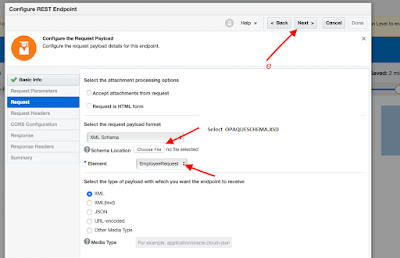
    Use case : We will create one Integration that can receive CSV data as Input and then Log the same data using Logger Action. 
    Step 1 : Create one App Driven Orchestration Integration 

    Knowledge :  👀 
    App Driven Orchestration ? : It enables you to create an integration that uses an event or business object to trigger the integration. It is a Multi-step Integration flow invoking applications, integrations and processes triggered by an Application or API.

    – Advertisement –


    Step 2 : Add Rest Trigger Connection type. You can follow this blog to create Rest Trigger Connection. 


    •  Enter any meaningful name and then click Next
    •  configure this window as suggested below :
      • *what is this endpoint’s relative Resource URI ? : /csvdata (you can enter any meaningful URI)
      • *What action do you want to perform on this endpoint : POST
      • Select configure a request payload for the response and then click Next
    • Now configure the Request Payload as suggested below
      • Select the request payload format : Binary
      • What is the media-type of Response Body ? (Content Type Header) : Select Other Media Type 
      • ︖ Media Type. : Enter text/plain
    • Rest Endpoint configuration completed. Click Done

    – Advertisement –


    Step 3 : Now in this step lets configure one Stage File Action to read the received csv file data.


    • Add Stage File activity


    Knowledge :  👀 
    Stage File Activity ? : It provide access to the Integration Cloud local file system server.  Using this activity you can Read,Write,List,Zip,Unzip etc. files that are already present in the local file server. You can use any of these operation by providing the File Name and its Directory Path.

    • Enter any meaning full name and click Next
    • Configure the stage File Action parameter as suggested below
      • *Choose the Stage File Operation : Read Entire File
      •  Configure File Reference : Select Yes
      • *Specify the File Reference  : Click Edit (Pencil icon) and then drag and drop *streamRefernece into Expression box (as shown in below image). click save and and click Exit Expression Builder

    •  Select Sample delimited document (e.g. CSV) to define the structure of the file contents. Then click Next

    • Define the structure of the file contents by selecting below Delimitated Sample File. After selecting file configure the other options as suggested below :

              Download Sample File

      • Enter  the record name : Student (you can give any meaning ful name)
      • Enter the Record set name : StudentsDetail (You can any meaningful name )
      • Select the Field Delimiter : Comma(,)
      • Optionally Enclosed by  :
      • Terminated By : ${eol}

                  Click Next 

    • Stage File Action configuration completed. Click Done.

    – Advertisement –


    Step 4 :Now lets add one Logger to log the received CSV data.


    Knowledge :  👀 

    Logger ? : It Enables you to add log messages to the activity stream and diagnostic logs.

    • Search for Logger action and add it in flow


    • Enter any meaningful name and then click Create 

    • Configure Logger option will get open , Select Log : Always and then click edit (pencil icon ) to map *Logger Message 

    • Drag and drop *StudentDetail tag from left hand side(Source side ) inside Epression box and then click validate and close

    • Click Validate and close 

    – Advertisement –


    Step 5 : Now enable the Tracking by clicking on right hand side hamburger sign and then click Tracking 


    • Drag and Drop *streamReference in Primary Tracking Field.You can select another also as per your requirement.

    Click Save 


    Knowledge :  👀 

    Assigning Business Identifiers for Tracking Fields ? : Business identifiers enable you to track payload fields in messages during runtime.You must assign business identifiers before you can activate an integration.

    • Integration is ready to test. Save the integration and Activate it.

    #Testing of Integration 

    Now lets test the integration by passing some sample csv data as input of this integration and lets see the data are getting generated in Log or not.


     [ Note : — If you want to test this integration by getting it trigger from any Source System (Like WMS System ). For that you can share the endpoint point url of this integration with WMS system and getting it configured in that system. After that that system can hit this integration by sending some CSV data. ]

    • Click on Run button
    • Click Test 
    • Pass the below sample CSV data and click Test

    Name,Roll
    Shyam,01
    Rashmi,02
    Raghu,03
    Rajesh,04

    Satya,05


    • You can see the input csv data in Log (as shown in below image)
    • If you want to see the CSV data in XML check the Read Response Payload.

    Completed. This way we can configure REST Trigger Endpoint to receive CSV data from Source System(Like WMS)

  • Configure REST Trigger Endpoint to Get CSV Data | Integration

    Configure REST Trigger Endpoint to Get CSV Data | Integration

    In this blog we will see the steps to configure REST Trigger (Source) Endpoint which can receive CSV data as Input from any source system (ex : from WMS System) and do the data processing as require further.


    Click to Zoom Out


    – Advertisement –


    Lets see the Steps in Detail by doing one end to end POC.
    Use case : We will create one Integration that can receive CSV data as Input and then Log the same data using Logger Action. 
    Step 1 : Create one App Driven Orchestration Integration 

    Knowledge :  👀 
    App Driven Orchestration ? : It enables you to create an integration that uses an event or business object to trigger the integration. It is a Multi-step Integration flow invoking applications, integrations and processes triggered by an Application or API.

    – Advertisement –


    Step 2 : Add Rest Trigger Connection type. You can follow this blog to create Rest Trigger Connection. 


    •  Enter any meaningful name and then click Next
    •  configure this window as suggested below :
      • *what is this endpoint’s relative Resource URI ? : /csvdata (you can enter any meaningful URI)
      • *What action do you want to perform on this endpoint : POST
      • Select configure a request payload for the response and then click Next
    • Now configure the Request Payload as suggested below
      • Select the request payload format : Binary
      • What is the media-type of Response Body ? (Content Type Header) : Select Other Media Type 
      • ︖ Media Type. : Enter text/plain
    • Rest Endpoint configuration completed. Click Done

    – Advertisement –


    Step 3 : Now in this step lets configure one Stage File Action to read the received csv file data.


    • Add Stage File activity


    Knowledge :  👀 
    Stage File Activity ? : It provide access to the Integration Cloud local file system server.  Using this activity you can Read,Write,List,Zip,Unzip etc. files that are already present in the local file server. You can use any of these operation by providing the File Name and its Directory Path.

    • Enter any meaning full name and click Next
    • Configure the stage File Action parameter as suggested below
      • *Choose the Stage File Operation : Read Entire File
      •  Configure File Reference : Select Yes
      • *Specify the File Reference  : Click Edit (Pencil icon) and then drag and drop *streamRefernece into Expression box (as shown in below image). click save and and click Exit Expression Builder

    •  Select Sample delimited document (e.g. CSV) to define the structure of the file contents. Then click Next

    • Define the structure of the file contents by selecting below Delimitated Sample File. After selecting file configure the other options as suggested below :

              Download Sample File

      • Enter  the record name : Student (you can give any meaning ful name)
      • Enter the Record set name : StudentsDetail (You can any meaningful name )
      • Select the Field Delimiter : Comma(,)
      • Optionally Enclosed by  :
      • Terminated By : ${eol}

                  Click Next 

    • Stage File Action configuration completed. Click Done.

    – Advertisement –


    Step 4 :Now lets add one Logger to log the received CSV data.


    Knowledge :  👀 

    Logger ? : It Enables you to add log messages to the activity stream and diagnostic logs.

    • Search for Logger action and add it in flow


    • Enter any meaningful name and then click Create 

    • Configure Logger option will get open , Select Log : Always and then click edit (pencil icon ) to map *Logger Message 

    • Drag and drop *StudentDetail tag from left hand side(Source side ) inside Epression box and then click validate and close

    • Click Validate and close 

    – Advertisement –


    Step 5 : Now enable the Tracking by clicking on right hand side hamburger sign and then click Tracking 


    • Drag and Drop *streamReference in Primary Tracking Field.You can select another also as per your requirement.

    Click Save 


    Knowledge :  👀 

    Assigning Business Identifiers for Tracking Fields ? : Business identifiers enable you to track payload fields in messages during runtime.You must assign business identifiers before you can activate an integration.

    • Integration is ready to test. Save the integration and Activate it.

    #Testing of Integration 

    Now lets test the integration by passing some sample csv data as input of this integration and lets see the data are getting generated in Log or not.


     [ Note : — If you want to test this integration by getting it trigger from any Source System (Like WMS System ). For that you can share the endpoint point url of this integration with WMS system and getting it configured in that system. After that that system can hit this integration by sending some CSV data. ]

    • Click on Run button
    • Click Test 
    • Pass the below sample CSV data and click Test

    Name,Roll
    Shyam,01
    Rashmi,02
    Raghu,03
    Rajesh,04

    Satya,05


    • You can see the input csv data in Log (as shown in below image)
    • If you want to see the CSV data in XML check the Read Response Payload.

    Completed. This way we can configure REST Trigger Endpoint to receive CSV data from Source System(Like WMS)

  • Configure REST Trigger Endpoint to Get CSV Data | Integration

    Configure REST Trigger Endpoint to Get CSV Data | Integration

    In this blog we will see the steps to configure REST Trigger (Source) Endpoint which can receive CSV data as Input from any source system (ex : from WMS System) and do the data processing as require further.


    Click to Zoom Out


    – Advertisement –


    Lets see the Steps in Detail by doing one end to end POC.
    Use case : We will create one Integration that can receive CSV data as Input and then Log the same data using Logger Action. 
    Step 1 : Create one App Driven Orchestration Integration 

    Knowledge :  👀 
    App Driven Orchestration ? : It enables you to create an integration that uses an event or business object to trigger the integration. It is a Multi-step Integration flow invoking applications, integrations and processes triggered by an Application or API.

    – Advertisement –


    Step 2 : Add Rest Trigger Connection type. You can follow this blog to create Rest Trigger Connection. 


    •  Enter any meaningful name and then click Next
    •  configure this window as suggested below :
      • *what is this endpoint’s relative Resource URI ? : /csvdata (you can enter any meaningful URI)
      • *What action do you want to perform on this endpoint : POST
      • Select configure a request payload for the response and then click Next
    • Now configure the Request Payload as suggested below
      • Select the request payload format : Binary
      • What is the media-type of Response Body ? (Content Type Header) : Select Other Media Type 
      • ︖ Media Type. : Enter text/plain
    • Rest Endpoint configuration completed. Click Done

    – Advertisement –


    Step 3 : Now in this step lets configure one Stage File Action to read the received csv file data.


    • Add Stage File activity


    Knowledge :  👀 
    Stage File Activity ? : It provide access to the Integration Cloud local file system server.  Using this activity you can Read,Write,List,Zip,Unzip etc. files that are already present in the local file server. You can use any of these operation by providing the File Name and its Directory Path.

    • Enter any meaning full name and click Next
    • Configure the stage File Action parameter as suggested below
      • *Choose the Stage File Operation : Read Entire File
      •  Configure File Reference : Select Yes
      • *Specify the File Reference  : Click Edit (Pencil icon) and then drag and drop *streamRefernece into Expression box (as shown in below image). click save and and click Exit Expression Builder

    •  Select Sample delimited document (e.g. CSV) to define the structure of the file contents. Then click Next

    • Define the structure of the file contents by selecting below Delimitated Sample File. After selecting file configure the other options as suggested below :

              Download Sample File

      • Enter  the record name : Student (you can give any meaning ful name)
      • Enter the Record set name : StudentsDetail (You can any meaningful name )
      • Select the Field Delimiter : Comma(,)
      • Optionally Enclosed by  :
      • Terminated By : ${eol}

                  Click Next 

    • Stage File Action configuration completed. Click Done.

    – Advertisement –


    Step 4 :Now lets add one Logger to log the received CSV data.


    Knowledge :  👀 

    Logger ? : It Enables you to add log messages to the activity stream and diagnostic logs.

    • Search for Logger action and add it in flow


    • Enter any meaningful name and then click Create 

    • Configure Logger option will get open , Select Log : Always and then click edit (pencil icon ) to map *Logger Message 

    • Drag and drop *StudentDetail tag from left hand side(Source side ) inside Epression box and then click validate and close

    • Click Validate and close 

    – Advertisement –


    Step 5 : Now enable the Tracking by clicking on right hand side hamburger sign and then click Tracking 


    • Drag and Drop *streamReference in Primary Tracking Field.You can select another also as per your requirement.

    Click Save 


    Knowledge :  👀 

    Assigning Business Identifiers for Tracking Fields ? : Business identifiers enable you to track payload fields in messages during runtime.You must assign business identifiers before you can activate an integration.

    • Integration is ready to test. Save the integration and Activate it.

    #Testing of Integration 

    Now lets test the integration by passing some sample csv data as input of this integration and lets see the data are getting generated in Log or not.


     [ Note : — If you want to test this integration by getting it trigger from any Source System (Like WMS System ). For that you can share the endpoint point url of this integration with WMS system and getting it configured in that system. After that that system can hit this integration by sending some CSV data. ]

    • Click on Run button
    • Click Test 
    • Pass the below sample CSV data and click Test

    Name,Roll
    Shyam,01
    Rashmi,02
    Raghu,03
    Rajesh,04

    Satya,05


    • You can see the input csv data in Log (as shown in below image)
    • If you want to see the CSV data in XML check the Read Response Payload.

    Completed. This way we can configure REST Trigger Endpoint to receive CSV data from Source System(Like WMS)